
Cohorts: Overview
Introduction
A Cohort is a group of learners who share access to the same courses or learning paths. Cohorts make it easier to manage learners at scale by assigning content and tracking progress collectively.
Each cohort includes:
- Owners: users who manage the cohort from the front-end Cohort dashboard
- Members: learners who belong to the cohort and access the assigned content
Creating or editing a cohort
Cohorts are managed in the CMS under Content Manager ➝ Cohort.
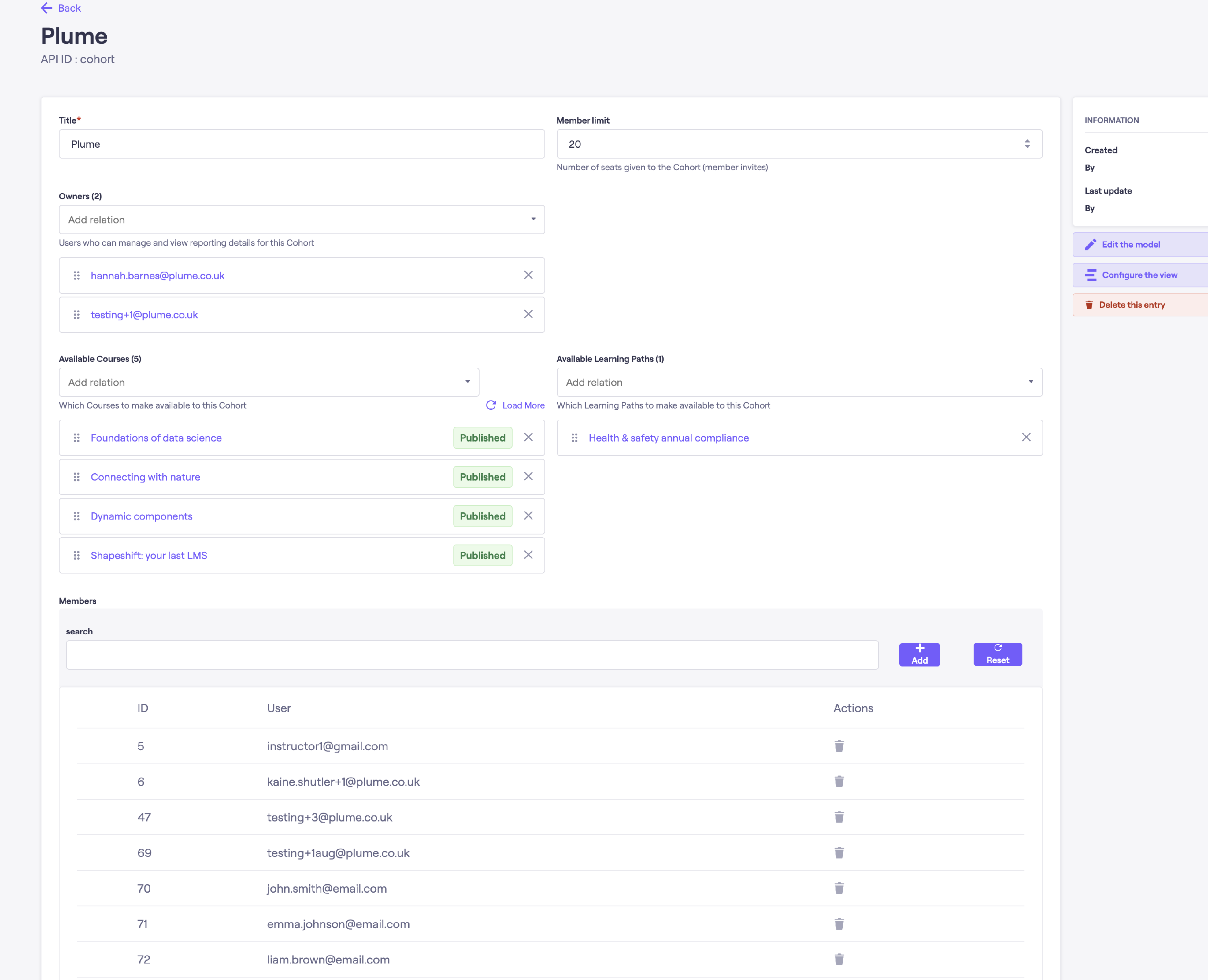
When creating or editing a cohort, you will see fields similar to the following (may differ per client configuration):
| Field | Description |
|---|---|
| Title | The display name of the cohort, such as “Finance Experts – 2025”. |
| Member limit (Seats) | The maximum number of members allowed in the cohort. Each accepted member uses one seat. |
| Available courses | The list of courses that all cohort members can access. |
| Available learning paths | If enabled, the learning paths available to members of this cohort. |
| Owners | Users who can manage the cohort through the front-end dashboard. |
| Members | Learners who belong to the cohort. Members are usually added by owners via invitations from the front end, but admins can also manage them here. |
An example can be seen below:
Seat management
Cohorts use a seat-based model to manage how many members can belong to a group.
- Each accepted member uses one seat.
- Invitations that have not been accepted do not use a seat.
- Owners can cancel pending invitations to free up seats.
- Once a user accepts an invite and becomes a member, their seat cannot be revoked without admin intervention.
- Admins can adjust the member limit (seat count) at any time in the CMS.
Course and learning path access
Cohort members automatically have access to all content listed under Available courses and Available learning paths.
Depending on the LMS configuration:
- These items appear in the learner’s My Learning area.
- They may also appear in the Course Library, if enabled.
Members can freely enroll in any available course or path without needing to purchase the item, or requiring manual approval.